
System Architecture
A deep dive into VaultPDF's No-Egress security model and tenant-native integration.
The No-Egress Philosophy
VaultPDF is engineered on the principle of Data Residency. Unlike traditional PDF APIs, your sensitive JSON data never leaves your environment.
Security First
The document rendering engine runs inside the customer's own tenant. Our central API only handles licensing handshakes, never document content.
For a detailed breakdown of authentication mechanisms, access controls, and document integrity enforcement, see Security & Verification.
Technical Stack
Serverless Rendering
VaultPDF processes document rendering serverlessly, allowing automatic scaling and low operational overhead for both SMB and enterprise workloads.
Async Queue Processing
VaultPDF supports optional asynchronous processing using a queue-based dispatch layer, enabling high-volume document generation and enterprise batch workflows.
Flexible Storage Providers
Templates and document payloads can be retrieved from Microsoft SharePoint, with planned support for additional providers such as Azure Blob Storage to support cloud-native deployments.
Secure License Validation
VaultPDF uses lightweight encrypted validation with HMAC-based verification to ensure authorized usage without transmitting sensitive document data outside the customer environment.
Deterministic Rendering Pipeline
Documents are processed through a multi-stage rendering pipeline that normalizes structure, resolves styles, validates layout safety, and produces consistent PDF output across dynamic datasets.
Enterprise Integration Ready
VaultPDF is designed to integrate easily with systems like Microsoft Dynamics 365 and Microsoft Power Automate, enabling automated document generation directly within business workflows.
Data Flow: How It Works
VaultPDF renders documents entirely within the customer's cloud environment using native services from Microsoft Azure. The following steps describe how a document request moves through the VaultPDF rendering system.
Trigger & JSON Payload
Your system (Dynamics 365, Power Apps, or any HTTP client) calls the VaultPDF rendering endpoint with the document data as a JSON payload.
License Validation
The engine performs a lightweight encrypted license check against the VaultPDF licensing service using metadata only. No document content is transmitted.
Template Retrieval
The rendering engine retrieves the .vpdf template file from your SharePoint assets library using Managed Identity - no stored credentials required.
Optional Batch Dispatch
For large workloads, jobs are queued for asynchronous processing via the built-in workflow queue.
Local Rendering
The PDF is generated entirely in memory inside the customer's Azure environment.
Document Delivery
The completed PDF is returned to the calling system or saved back to SharePoint.
Architecture Diagram
Canonical architecture diagram and Mermaid source (interactive):
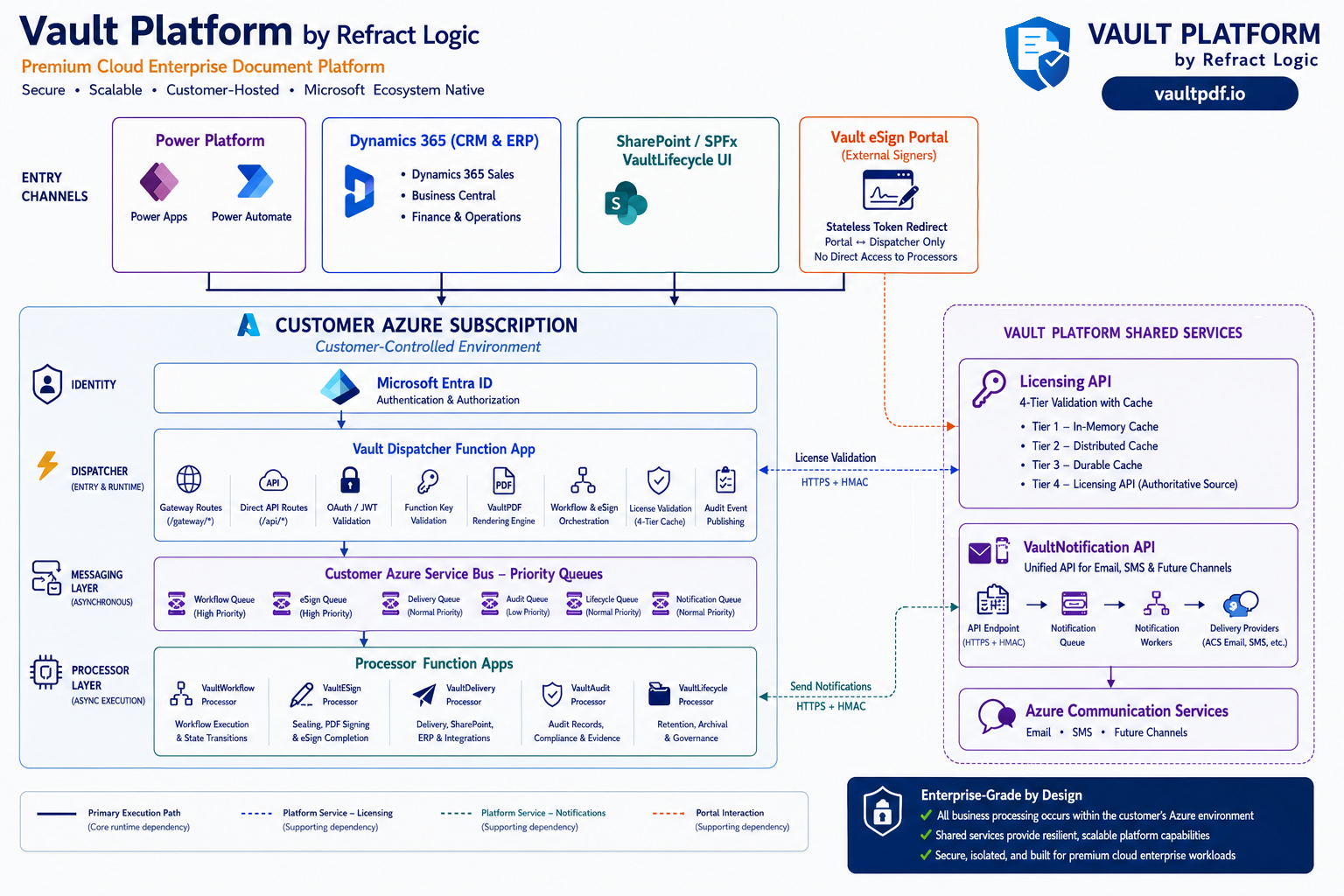
The Portal is stateless — document bytes are streamed from customer-controlled storage via the Dispatcher; notifications carry metadata only.
flowchart TB

subgraph EC["Entry Channels"]
PP["Power Platform<br/>Power Apps<br/>Power Automate"]
D365["Dynamics 365 (CRM & ERP)<br/>• Dynamics 365 Sales<br/>• Business Central<br/>• Finance & Operations"]
SP["SharePoint / SPFx<br/>VaultLifecycle UI"]
PORTAL["Vault eSign Portal<br/>(External Signers)"]
end

subgraph CUSTOMER["Customer Azure Environment"]
ENTRA["Microsoft Entra ID<br/>Authentication & Authorization"]
DISP["Vault Dispatcher Function App<br/>• Gateway Routes (/gateway/*)<br/>• Direct API Routes (/api/*)<br/>• OAuth / JWT Validation<br/>• VaultPDF Rendering Engine<br/>• Workflow & eSign Orchestration"]
BUS["Customer Azure Service Bus<br/>Priority Queues<br/>Workflow • eSign • Delivery • Notification • Audit"]
PROC["Processor Function Apps<br/>VaultWorkflow<br/>VaultESign<br/>VaultDelivery<br/>VaultAudit<br/>VaultLifecycle"]
ENTRA --> DISP
DISP --> BUS
BUS --> PROC
end

subgraph SHARED["Vault Platform Shared Services (Refract Logic)"]
LIC["Licensing API — licenseKey + tenantId only"]
NOTIFY["VaultNotification API — metadata only"]
ACS["Azure Communication Services — Email/SMS"]
NOTIFY --> ACS
end

PP --> ENTRA
D365 --> ENTRA
SP --> ENTRA
PORTAL -. "Portal ↔ Dispatcher" .-> DISP
DISP -. "License Validation" .-> LIC
PROC -. "Workflow / Delivery / eSign Notifications" .-> NOTIFY
PORTAL -. "Invitation Emails / Signer Notifications" .-> NOTIFY
Licensing & Governance
We manage global governance through our centralized subscription portal:
{
  "tenantId": "client-uuid-1234",
  "apiKey": "vpdf_live_xxxxxxxx",
  "action": "verify_and_log",
  "usageMetadata": { "type": "invoice_gen", "region": "US-South" }
}
API Key Security
Never expose your apiKey in client-side code or commit it to version control. Use Azure Key Vault or environment variables to manage secrets securely.
See the Architecture in Action
Explore the interactive playground to trace a live document request through the full No-Egress pipeline.
Capabilities & Features
A comprehensive overview of VaultPDF's document rendering capabilities, enterprise features, async workflows, and monitoring tools - all in a single self-hosted engine.
VaultPDF Rendering Pipeline
VaultPDF processes every template through a deterministic multi-stage rendering pipeline ensuring layout stability, visual consistency, and secure document generation, structured across 12 sequential stages from structure normalization to final PDF output.