
Signature Zones
Reserve space for digital signatures in your PDFs using platform-agnostic anchor zones that integrate with DocuSign, Adobe Sign, Dropbox Sign, and other e-signature platforms. Optionally append a tamper-evident Approval & Verification page.
VaultPDF supports signature zones that embed a uniquely-anchored placeholder rectangle into any PDF document. Zones are platform-agnostic. The anchor text can be mapped to DocuSign, Adobe Sign, Dropbox Sign, or any other e-signature platform in a post-processing step. No platform SDK is required at render time.
VaultPDF can also append an optional Approval & Verification page that consolidates all signers, document metadata, a digital thumbprint, and a QR code into a single printable summary at the end of the document.
Tamper-evident, not legally binding
VaultPDF signature zones are structural placeholders that reserve space and inject anchor text. The digital thumbprint on the Approval page is a deterministic integrity marker, not a cryptographic signature. Actual legally binding e-signatures are applied by DocuSign, Adobe Sign, Dropbox Sign, or your chosen platform after VaultPDF renders the PDF. VaultPDF works alongside these platforms, not as a replacement.
How Anchors Work
VaultPDF injects a plain-text anchor string inside the rendered signature box. The e-signature platform scans the PDF, detects the anchor, and places its interactive field at the correct coordinates automatically. No VaultPDF-specific integration is needed on the platform side.
[[SIGN_<ROLE>|required]]    # mandatory signer
[[SIGN_<ROLE>|optional]]    # optional signer
Key Capabilities
Reserved Signature Box
Each zone renders as a bordered, fixed-size rectangle. No surrounding content overflows into it. Width, height, and border style are fully configurable per zone.
Role-Based Zones
Assign a unique role to each zone (preparer, manager, customer, legal, cfo, etc.). The role becomes part of the anchor tag and maps to the data payload.
Optional Name & Date
showName and showDate render pre-filled signer info from the data payload below the box. Each flag is independently toggleable.
Extended Anchor Types
Beyond signatures, VaultPDF supports Initials, Checkbox, and Date anchor types for enterprise signing workflows.
Works Everywhere
Signature zones are first-class layout elements. They work inside nested tables, overflow sections, and both real-time and batch rendering modes.
Approval & Verification Page
Optionally append a consolidated approval page with signer grid, document metadata, digital thumbprint, and QR code, all driven by the same signatures payload.
SharePoint Audit Trail
After signing, metadata can be stamped back to SharePoint for full document-level auditability and compliance tracking.
Inline Signature Zones
Schema Reference
Add signature zones as children of any section node using "type": "signature".
{
  "type": "signature",
  "label": "Manager Approval",
  "role": "manager",
  "fieldType": "sign",
  "width": 220,
  "height": 80,
  "required": true,
  "showName": true,
  "showDate": true,
  "borderStyle": "full",
  "textColor": "#000000"
}
Properties
| Property | Type | Default | Description |
|---|---|---|---|
label | string | "Signature" | Text displayed above the box |
role | string | "signer" | Unique signer ID used in the anchor prefix and maps to signatures.<role> in the payload |
fieldType | string | "sign" | Type of field to render. Options: sign, initials, check, date. Controls the anchor prefix |
width | number | 220 | Box width in points |
height | number | 80 | Box height in points |
required | boolean | true | Controls whether the anchor emits required or optional. Can be overridden per-signer in the data payload |
showName | boolean | true | Displays signer name from signatures.<role>.name |
showDate | boolean | true | Displays signed date from signatures.<role>.date |
borderStyle | string | "full" | Box border style. full = full rectangle, minimal = bottom line only, none = no box (anchor text only) |
textColor | string | theme primary | Anchor text color inside the box. Use "#FFFFFF" for invisible anchors on white backgrounds |
Data Payload
Signature data lives under a top-level signatures object in the payload. Each key must exactly match the role defined in the template.
Single Approver
{
  "documentTitle": "Purchase Order #PO-2026-001",
  "orderNumber": "PO-2026-001",
  "vendor": "Acme Supplies Ltd.",
  "totalAmount": 12500.00,
  "currency": "USD",
  "requestedBy": "Jane Smith",
  "department": "Operations",
  "signatures": {
    "manager": {
      "name": "Robert Chen",
      "date": "2026-03-15",
      "required": false
    }
  }
}
Overriding required in the payload
Adding "required": false to a signer entry overrides the template default for that signer only. The anchor emits optional instead of required, for example [[SIGN_MANAGER|optional]].
Three-Stage Approval
{
  "documentTitle": "Capital Expenditure Request #CAPEX-2026-042",
  "requestNumber": "CAPEX-2026-042",
  "projectName": "Server Infrastructure Upgrade",
  "requestedAmount": 245000.00,
  "currency": "USD",
  "requestedBy": "Michael Torres",
  "department": "IT Infrastructure",
  "signatures": {
    "preparer": { "name": "Michael Torres", "date": "2026-03-10" },
    "manager":  { "name": "Sarah Kim",      "date": "2026-03-12" },
    "customer": { "name": "David Okafor",   "date": "" }
  }
}
Enterprise Five-Party Signing
{
  "documentTitle": "Master Services Agreement - Enterprise License",
  "contractId": "MSA-2026-ENT-007",
  "effectiveDate": "2026-04-01",
  "vendorName": "VaultPDF Technologies Inc.",
  "clientName": "Contoso Corporation",
  "contractValue": 120000.00,
  "currency": "USD",
  "signatures": {
    "preparer": { "name": "Alice Nguyen", "date": "2026-03-14" },
    "legal":    { "name": "James Obi",    "date": "2026-03-14" },
    "finance":  { "name": "Priya Mehta",  "date": "" },
    "cfo":      { "name": "",             "date": "" },
    "customer": { "name": "",             "date": "" }
  }
}
Payload Notes
- Keys inside
signaturesmust exactly match therolevalues in the template. nameanddateare optional. VaultPDF still renders the box and anchor if omitted or empty.- An empty string or
nullfordatemeans the signer will fill it on the e-signature platform. - Add
"required": falseto any signer entry to downgrade that zone to optional at runtime. - The anchor is structural and is always injected regardless of whether
nameordateare present.
Anchor Format Reference
The anchor format is [[<PREFIX>_<ROLE_UPPERCASE>|required/optional]]. The prefix is determined by the fieldType property on the schema node.
fieldType to Anchor Prefix
fieldType | required: true | required: false |
|---|---|---|
"sign" | [[SIGN_MANAGER|required]] | [[SIGN_MANAGER|optional]] |
"initials" | [[INITIALS_MANAGER|required]] | [[INITIALS_MANAGER|optional]] |
"check" | [[CHECK_MANAGER|required]] | [[CHECK_MANAGER|optional]] |
"date" | [[DATE_MANAGER|required]] | [[DATE_MANAGER|optional]] |
Schema node examples
{ "type": "signature", "props": { "role": "manager", "fieldType": "sign",     "required": true  } }
{ "type": "signature", "props": { "role": "manager", "fieldType": "initials", "required": true  } }
{ "type": "signature", "props": { "role": "manager", "fieldType": "check",    "required": false } }
{ "type": "signature", "props": { "role": "manager", "fieldType": "date",     "required": true  } }
Payload override
The required flag can be overridden at signer level in the data payload independently of the template:
"signatures": {
  "customer": {
    "name": "Robert Chen",
    "date": "2026-03-15",
    "required": false
  }
}
This produces [[INITIALS_CUSTOMER|optional]] when fieldType is "initials", regardless of the template setting.
Platform Compatibility
The [[SIGN_ROLE|required]] anchor pattern is compatible with the DocuSign text tag standard. For Adobe Sign, configure your account to recognise this anchor prefix. For other platforms, use the extended anchor types above or map them in a post-processing step.
How Inline Zones Render
Box Reservation
A bordered rectangle is drawn at the configured width and height. The zone is a block-level element and no surrounding content flows into it. borderStyle controls whether a full box, bottom-line-only, or no border is drawn.
Label Rendering
The label value is rendered above the box in the active section font and style.
Anchor Injection
A plain-text anchor is injected inside the box at render time. The format is [[<PREFIX>_{ROLE_UPPERCASE}|{required|optional}]]. E-signature platforms scan for this string and attach their interactive field at the exact coordinates.
Name & Date Lines
If showName or showDate is enabled, VaultPDF reads signatures.<role>.name and signatures.<role>.date from the payload and renders pre-filled lines below the box.
Approval & Verification Page
The Approval & Verification page is an optional last page appended to the document. It consolidates all signers into a structured grid and optionally includes a digital thumbprint and QR code. It is triggered separately from inline zones.
Invoice-2026-0029.pdf
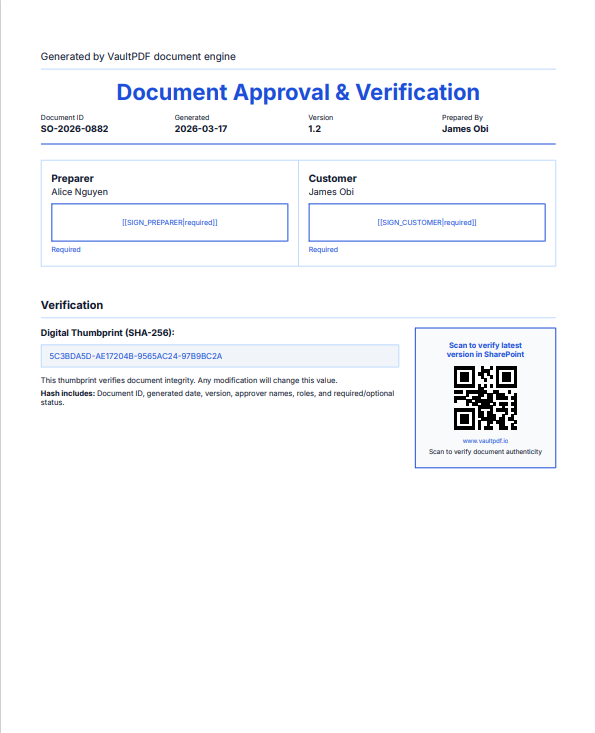
Approval & Verification page: signer grid, digital thumbprint, QR code
Auto-appended
What the thumbprint is and isn't
The digital thumbprint on the Approval page is a deterministic, single-pass hash (DJB2-based) computed at render time from: document ID, generated date, version, and each approver's role, name, and required/optional status. It is a tamper-evident integrity marker. Any modification to those inputs produces a different value. It is not a cryptographic signature, does not use a private key, and is not a substitute for a legally binding e-signature. Use it to detect accidental edits or version drift; use DocuSign / Adobe Sign / etc. for legal validity.
Triggering the Approval Page
The page is shown when any of these conditions is true, listed in evaluation order:
| Source | Field | Effect |
|---|---|---|
data.documentAttestation.showApprovalPanel | true | Show approval page |
data.showApprovalPanel | true | Show approval page (legacy top-level) |
templateSettings.approvalPanel.enabled | true | Show approval page (designer toggle) |
data.showApprovalPanel | false | Suppress approval page even when template enables it |
data.documentAttestation.showApprovalPanel | false | Suppress approval page even when template enables it |
Approval Page Data Structure
Signatures for the approval page come from exactly the same signatures object used by inline zones:
{
  "showApprovalPanel": true,
  "documentId": "PO-2026-001",
  "generatedDate": "2026-03-16",
  "version": "1.0",
  "user": "Jane Smith",
  "signatures": {
    "manager":  { "name": "Robert Chen",  "date": "2026-03-15", "required": true  },
    "customer": { "name": "David Okafor", "date": "",           "required": false }
  }
}
Alternatively, group everything under documentAttestation (preferred for new payloads):
{
  "documentAttestation": {
    "showApprovalPanel": true,
    "documentId": "PO-2026-001",
    "generatedDate": "2026-03-16",
    "version": "1.0",
    "user": "Jane Smith",
    "signatureColumns": 2,
    "includeDigitalThumbprint": true,
    "verificationUrl": "https://contoso.sharepoint.com/sites/docs/PO-2026-001",
    "signatures": {
      "manager":  { "name": "Robert Chen",  "required": true  },
      "customer": { "name": "David Okafor", "required": false }
    }
  }
}
Approval Page Properties
All properties support three resolution sources with this precedence:
documentAttestation.<field>→data.<field>→templateSettings.approvalPanel.<field>→ default
| Property | Type | Default | Description |
|---|---|---|---|
showApprovalPanel | boolean | none | Triggers the approval page. false explicitly suppresses it even when templateSettings.approvalPanel.enabled is true |
signatureColumns | 1|2|3 | 2 | Number of columns in the signer grid. Clamped to 1–3 |
includeDigitalThumbprint | boolean | false | Renders the Digital Thumbprint block in the Verification section |
verificationUrl | string | none | URL encoded as a QR code in the Verification section. Also accepts sharePointUrl or documentUrl as aliases. Supports {{token}} resolution |
headingLabel | string | "Approval & Verification" | Page heading text. Supports {{token}} resolution |
headingFontSize | number | 14 | Heading font size in points |
headingAlignment | string | "left" | Heading alignment: left, center, right |
borderStyle | string | "full" | Signer cell border style. full = full rectangle, minimal = bottom line only |
textColor | string | theme primary | Color of [[SIGN_ROLE|required]] anchor text in each cell. Use "#FFFFFF" to render it invisible |
user | string | none | "Prepared By" value shown in the document metadata strip. Supports {{token}} resolution |
version | string | "1.0" | Document version shown in the metadata strip |
priority | string | none | Optional priority label shown in the metadata strip |
templateSettings.approvalPanel (Designer Configuration)
Any of the above properties can be set once in the template so they never need repeating in the data payload:
{
  "templateSettings": {
    "approvalPanel": {
      "enabled": true,
      "signatureColumns": 2,
      "headingLabel": "Approval & Verification",
      "headingAlignment": "left",
      "borderStyle": "minimal",
      "textColor": "#FFFFFF",
      "includeDigitalThumbprint": false,
      "verificationUrl": "{{sharePointUrl}}"
    }
  }
}
Per-document overrides
Values in data.documentAttestation or data always take precedence over templateSettings.approvalPanel. You can set sensible defaults in the template and override individual fields per document at send time.
Verification Section
The Verification section appears below the signer grid when either includeDigitalThumbprint: true or a verificationUrl is provided.
| Content | Condition | Layout |
|---|---|---|
| Digital Thumbprint block | includeDigitalThumbprint: true | Left column |
| QR code panel | verificationUrl present | Right column |
| QR only (no thumbprint) | verificationUrl present, thumbprint off | Centred |
The thumbprint is computed from: document ID, generated date, version, and each approver's role + name + required/optional status. Any change to these fields produces a different hash, which is what makes the page tamper-evident.
Template JSON Examples
Single Signature (Manager Only)
{
  "schemaVersion": "2.0",
  "rootId": "root",
  "nodes": {
    "root": {
      "id": "root",
      "type": "root",
      "children": ["header1", "section_signatures"]
    },
    "header1": {
      "id": "header1",
      "type": "header",
      "props": {
        "title": "{{documentTitle}}",
        "subtitle": "{{orderNumber}}"
      }
    },
    "section_signatures": {
      "id": "section_signatures",
      "type": "section",
      "props": { "title": "Approval Signatures" },
      "children": ["sig_manager"]
    },
    "sig_manager": {
      "id": "sig_manager",
      "type": "signature",
      "props": {
        "label": "Manager Approval",
        "role": "manager",
        "width": 220,
        "height": 80,
        "required": true,
        "showName": true,
        "showDate": true
      }
    }
  }
}
Three-Stage Side-by-Side Approval
{
  "schemaVersion": "2.0",
  "rootId": "root",
  "nodes": {
    "root": { "id": "root", "type": "root", "children": ["section_sigs"] },
    "section_sigs": {
      "id": "section_sigs",
      "type": "section",
      "props": { "title": "Approval Signatures" },
      "children": ["sig_preparer", "sig_manager", "sig_customer"]
    },
    "sig_preparer": {
      "id": "sig_preparer",
      "type": "signature",
      "props": { "label": "Prepared By",        "role": "preparer", "width": 220, "height": 80, "required": true,  "showName": true, "showDate": true }
    },
    "sig_manager": {
      "id": "sig_manager",
      "type": "signature",
      "props": { "label": "Manager Approval",   "role": "manager",  "width": 220, "height": 80, "required": true,  "showName": true, "showDate": true }
    },
    "sig_customer": {
      "id": "sig_customer",
      "type": "signature",
      "props": { "label": "Customer Signature", "role": "customer", "width": 220, "height": 80, "required": false, "showName": true, "showDate": true }
    }
  }
}
Designer Shorthand Notation
Prepared By
{{signatureZone:preparer width=220 height=80 required=true}}

Manager Approval
{{signatureZone:manager width=220 height=80 required=true}}

Customer Signature
{{signatureZone:customer width=220 height=80 required=false}}
Page Break Behaviour
If a row of signature zones does not fit within the remaining page height, VaultPDF emits a page break before the section. Keep height consistent across zones in the same row for predictable layout.
Approval Page with Thumbprint and QR Code
{
  "documentTitle": "Service Agreement",
  "documentId": "MSA-2026-ENT-007",
  "generatedDate": "2026-03-16",
  "version": "2.1",
  "documentAttestation": {
    "showApprovalPanel": true,
    "signatureColumns": 3,
    "includeDigitalThumbprint": true,
    "verificationUrl": "https://contoso.sharepoint.com/sites/contracts/MSA-2026-ENT-007",
    "borderStyle": "minimal",
    "textColor": "#FFFFFF",
    "signatures": {
      "preparer": { "name": "Alice Nguyen", "required": true  },
      "legal":    { "name": "James Obi",    "required": true  },
      "cfo":      { "name": "",             "required": true  }
    }
  }
}
Integration Notes
- Platform-agnostic: Anchors are plain text. Any e-signature SDK can find and replace them without a VaultPDF-specific integration.
- Complementary, not competing: VaultPDF renders the PDF shell with placeholders and a tamper-evident approval record. DocuSign, Adobe Sign, or Dropbox Sign handle the legally binding signature step.
- No payload required for anchor placement: The anchor is structural. Signer names and dates in the payload are for display only and do not affect anchor injection.
- Deterministic placement: Signature zones respect all VaultPDF layout rules including tables, overflow, and nested sections.
- Batch safe: Zones and approval pages work identically in real-time and batch queue rendering modes.
- Inline zones hidden when approval page active: When
showApprovalPanelistrue, inline signature zone nodes are automatically hidden from the main document body. All signers appear exclusively on the Approval page. - SharePoint metadata: After signing, completion metadata can be stamped back to SharePoint for a full audit trail.
Ready to add signatures to your documents?
Explore the rendering pipeline to understand how signature zones interact with nested tables and overflow handling.
Deterministic Auditing (Explain)
The "Black Box" recorder for every document transformation and redaction.
VaultPacks - Template & Process Catalog
Pre-built content bundles that combine document templates, governance workflows, validation workflows, approval processes, and delivery configurations into deployable business solutions.